
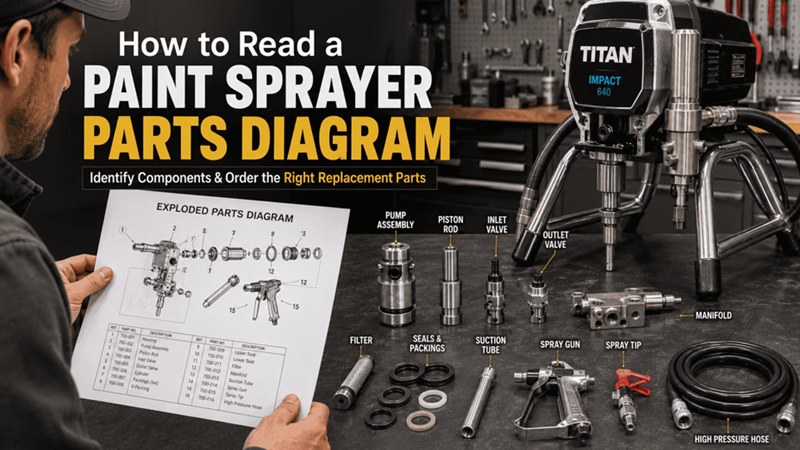
Ordering the wrong part is one of the most common and preventable sources of downtime in spray equipment maintenance. A contractor orders what they think is the right inlet valve, it arrives, and it’s for a different fluid section configuration. The machine stays down, the part gets returned, the correct part gets ordered, and two to three days of productive time evaporate — all because the wrong reference was used at the order stage.
The OEM parts diagram eliminates this problem entirely, when used correctly. It is the definitive, model-specific reference that translates a visible problem on your machine into an exact part number with zero ambiguity. Understanding how to read one is a skill that takes about ten minutes to learn and saves hours for the rest of your time in the trade.
What a Parts Diagram Is and What It Isn’t
A parts diagram is an exploded view illustration of a machine or assembly. Every component is drawn separately and arranged spatially to show how it fits relative to adjacent parts. Each component in the drawing is numbered, and a corresponding parts list table translates those numbers into OEM part numbers, descriptions, and quantities.
The diagram is not a schematic — it does not show you how the electrical or pneumatic systems work. It does not tell you how to perform a repair. It is purely a parts identification tool: a visual map that connects what you can see on your machine to the part number you need to order.
OEM diagrams are produced by the manufacturer for every model in their catalog. The part numbers in the diagram are the same numbers used in the manufacturer’s inventory and ordering systems. When you give an authorized dealer an OEM part number from the correct diagram for your model, there is no ambiguity about what you need.
The Anatomy of an OEM Parts Diagram
Every parts diagram has the same basic structure, regardless of what assembly it covers.
Model Identification at the Top
The most important element of any diagram is the model designation in the header. This is the specific machine or assembly the diagram applies to. Before you use a diagram for any order, confirm that the model designation matches your machine exactly.
This sounds obvious, but it’s where most ordering errors originate. A Titan Impact 440 and a Titan Impact 840 look very similar in exploded view illustrations. Many components appear visually identical across models. But they’re different machines with different fluid section specifications, and the part numbers for their fluid section components are not interchangeable. Using the 840 diagram for a 440 gets you parts that won’t fit.
The Exploded View Illustration
The main body of the diagram is the exploded view — every component in the assembly drawn separately and positioned to show its relationship to adjacent parts. Components that connect directly to each other in the assembled machine are shown near each other in the diagram, pulled apart just enough to be individually visible.
Spatial position in the diagram tells you assembly sequence. The component drawn at the bottom of the fluid section diagram is the component that installs from the bottom of the fluid section. The components drawn stacked from bottom to top install in that order.
Reference Numbers
Each component in the illustration has a reference number — typically a small circled number or a number with a leader line pointing to the component. The reference number is a position identifier within that specific diagram. It tells you where in the parts list table to look up the corresponding OEM part number.
Important: reference numbers are diagram-specific. Reference number 7 in the Impact 440 fluid section diagram is a different component from reference number 7 in the Impact 840 fluid section diagram. Never use a reference number as an identifier when ordering — only the OEM part number from the parts list table is a universal identifier.
The Parts List Table
Alongside the illustration is a table that lists every reference number in the diagram with three critical pieces of information: the OEM part number, the description, and the quantity per assembly.
The OEM part number is a specific numeric or alphanumeric code that uniquely identifies the component across all of the manufacturer’s systems. This is the number you use to order.
The description confirms you’re looking at the right component — “inlet valve assembly,” “throat packing,” “piston rod complete,” and so on.
The quantity tells you how many of that component are used in the assembly. Some assemblies require two or three of the same component. If you’re doing a complete rebuild, you need the quantity shown, not just one of each unique component.
Finding the Right Diagram for Your Machine
Locate Your Model Number
The model number is on a data plate affixed to the machine — typically on the back of the motor housing, the side of the frame near the base, or on the underside of the machine for portable units. The model number and the serial number are both on this plate.
The model number tells you which diagram to use. The serial number can be important for older machines that may have had running production changes — different internal configurations under the same model designation at different production dates. When dealing with an older machine where parts compatibility isn’t clear from the diagram, having the serial number available when you contact a dealer can save a return.
Start with the Complete Machine Diagram, then Navigate to the Assembly
Most machines have multiple diagrams: one for the complete machine overview, one for the fluid section, one for the gun assembly, one for the motor and drive components. Start with the complete machine overview to orient yourself to what’s shown where, then navigate to the specific assembly diagram for the component you need to identify.
If you know the symptom but aren’t sure which assembly it belongs to — material in the wet cup, for example — the complete machine diagram helps you locate which assembly diagram covers that area.
The Order By Parts Diagram System
AllTitanParts.com has a parts diagram system covering Titan, SprayTech, Speeflo Commander, Speeflo Admiral, and Wagner models. You select your machine from the model browser, navigate the diagram visually, and the OEM part number for the selected component populates for direct ordering. This eliminates the manual cross-reference step and significantly reduces the risk of referencing the wrong diagram or transcribing a part number incorrectly.
Reading the Diagram Step by Step
Step 1: Confirm the model identification at the top of the diagram matches your machine.
Not similar to your machine — exactly your machine. Impact 440 is not the same as ControlMax 440. Impact 440 Gen 1 may not be the same as Impact 440 Gen 3 if there were production changes between them. If you’re unsure, call the dealer and confirm with your model and serial number before ordering.
Step 2: Locate the component you need in the exploded view illustration.
Find it visually. If you have the machine apart, hold the part next to the illustration and match shapes. The exploded view is drawn to be visually recognizable, not just schematically accurate. The component you have in your hand should look like the one in the illustration.
If you’re not sure which component failed — you have a symptom but haven’t identified the cause — use the diagram to understand the assembly and think through which component in the sequence is responsible for the function that’s failing.
Step 3: Note the reference number for that component.
Find the small number associated with the component in the illustration and note it.
Step 4: Find that reference number in the parts list table.
Locate the row with that reference number in the adjacent table. Confirm the description matches what you’re looking at. Note the OEM part number and the quantity per assembly.
Step 5: Order by OEM part number, not by description.
When placing your order — whether online through a parts system or by phone — use the OEM part number. “Inlet valve assembly for a Titan 440” can match multiple components across multiple configurations. “0293793” does not. The part number eliminates the ambiguity.
The full Titan parts list at AllTitanParts.com is searchable by part number, allowing you to confirm what you’ve identified from the diagram before you order.
Common Errors That Cost Time and Money
Using a diagram for a similar but different model. The most common ordering error. Always confirm the model designation in the header matches your machine exactly.
Ordering by reference number rather than OEM part number. Reference numbers are not universal. OEM part numbers are.
Ignoring the quantity column. If the diagram shows quantity 2 for a component and you order 1, you’ll have to order again. Check the quantity before you place the order.
Assuming a kit doesn’t exist when individual components are shown. Many commonly serviced assemblies have a service kit combining all the wear components into a single part number. Individual components are listed in the diagram, but a rebuild kit part number is listed separately — usually at the end of the section. The kit is almost always more economical than ordering individual components and ensures you have everything the service requires.
For fluid section rebuilds, repacking kits for Titan and SprayTech models bundle the packing stack, O-rings, and throat seal into a single part number — simpler to order, complete for the job, and often more economical than sourcing components individually.
When the Diagram Doesn’t Match What You See
Occasionally, particularly on older machines or machines that have been previously repaired, what you find when you disassemble a component doesn’t match what the diagram shows. Different configuration, additional components, or components that look visually different from the illustration.
Don’t order from memory or assumption in this situation. Stop and call. An experienced parts dealer can usually identify the configuration from your model and serial number and confirm which parts you actually need before you order. A five-minute phone call is significantly cheaper than ordering the wrong parts, waiting for delivery, finding they don’t fit, returning them, and waiting again.
Nnanna Otuonye is the founder of AllTitanParts.com, an authorized OEM dealer of Titan, SprayTech, Wagner, and Speeflo airless sprayer parts located at 5250 Gulfton St, Suite 1H, Houston, Texas 77081. With over 20 years in the spray equipment industry, he supplies painting contractors and industrial coating professionals across the United States with genuine factory parts and same-day shipping.